
Ravindra Singh
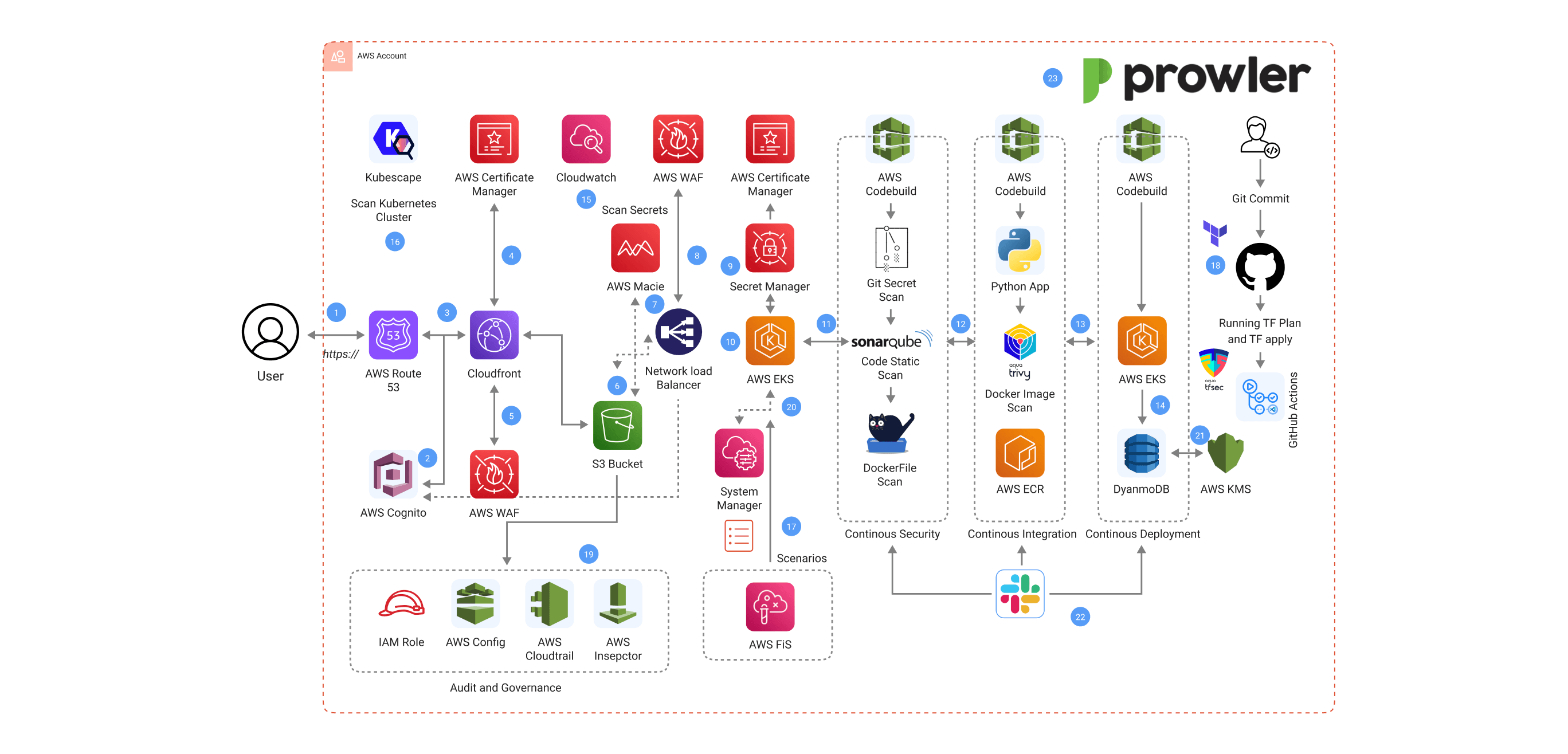
In today's digital world, where users entrust personal photos to online platforms, security and reliability are paramount for photo-sharing applications. Imagine a scenario where a security breach exposes user data or a system failure disrupts access to precious memories. To address these concerns, developers are increasingly adopting DevSecOps practices. DevSecOps is a security-focused approach to software development that integrates security considerations throughout the entire development lifecycle. This ensures that security is not an afterthought but a core principle from the very beginning.
SourceCode Link:
This guide will explore how DevSecOps can be leveraged to build a secure and reliable photo-sharing application. We'll delve into the tools and services used within this approach, focusing on how they work together to create a robust and resilient system.
How the Architecture Works
Step 1: Building a Secure Foundation with Infrastructure as Code (IaC)
The first step involves establishing a solid foundation for your application's infrastructure. Here's where Infrastructure as Code (IaC) comes in. IaC essentially means treating your infrastructure like code. Tools like Terraform allow you to define the infrastructure components (servers, databases, etc.) in configuration files. These files become version controlled, meaning changes are tracked and easily rolled back if necessary. This approach ensures consistent and repeatable infrastructure provisioning, minimizing configuration errors and improving security.
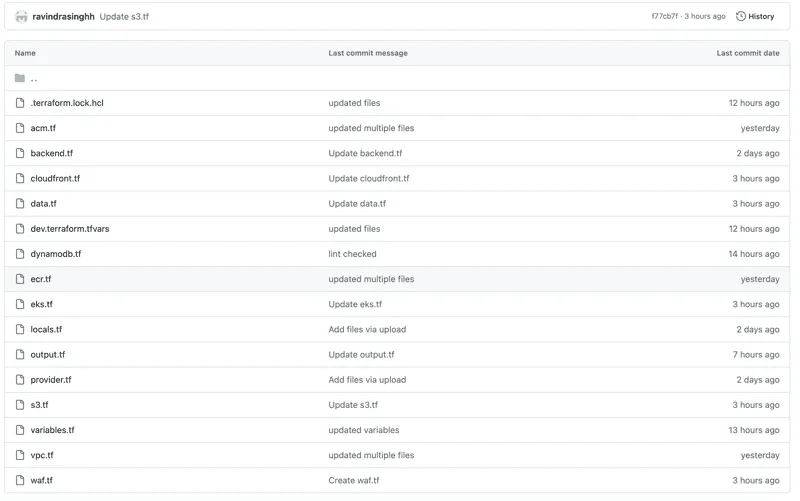
Step 2: Automating the Pipeline with Version Control and GitHub Actions
Version control systems like GitHub act as a central repository for your code and IaC configurations. These configurations are stored alongside your application code, ensuring everything is kept in sync. GitHub Actions, a powerful automation engine, plays a crucial role in streamlining the development and deployment process. You can define workflows within GitHub Actions that trigger various tasks automatically upon code changes. This automation can include security scanning of your IaC code with tools like TFSec and Checkov. Here's a breakdown of what each tool offers:
- TFSec
- Specifically designed for Terraform configurations, offering in-depth analysis for potential security misconfigurations.
- Integrates seamlessly with GitHub Actions, allowing you to scan your Terraform code as part of your automated workflow.
- Provides detailed reporting on identified vulnerabilities, making it easier to understand and fix security issues within your infrastructure code.
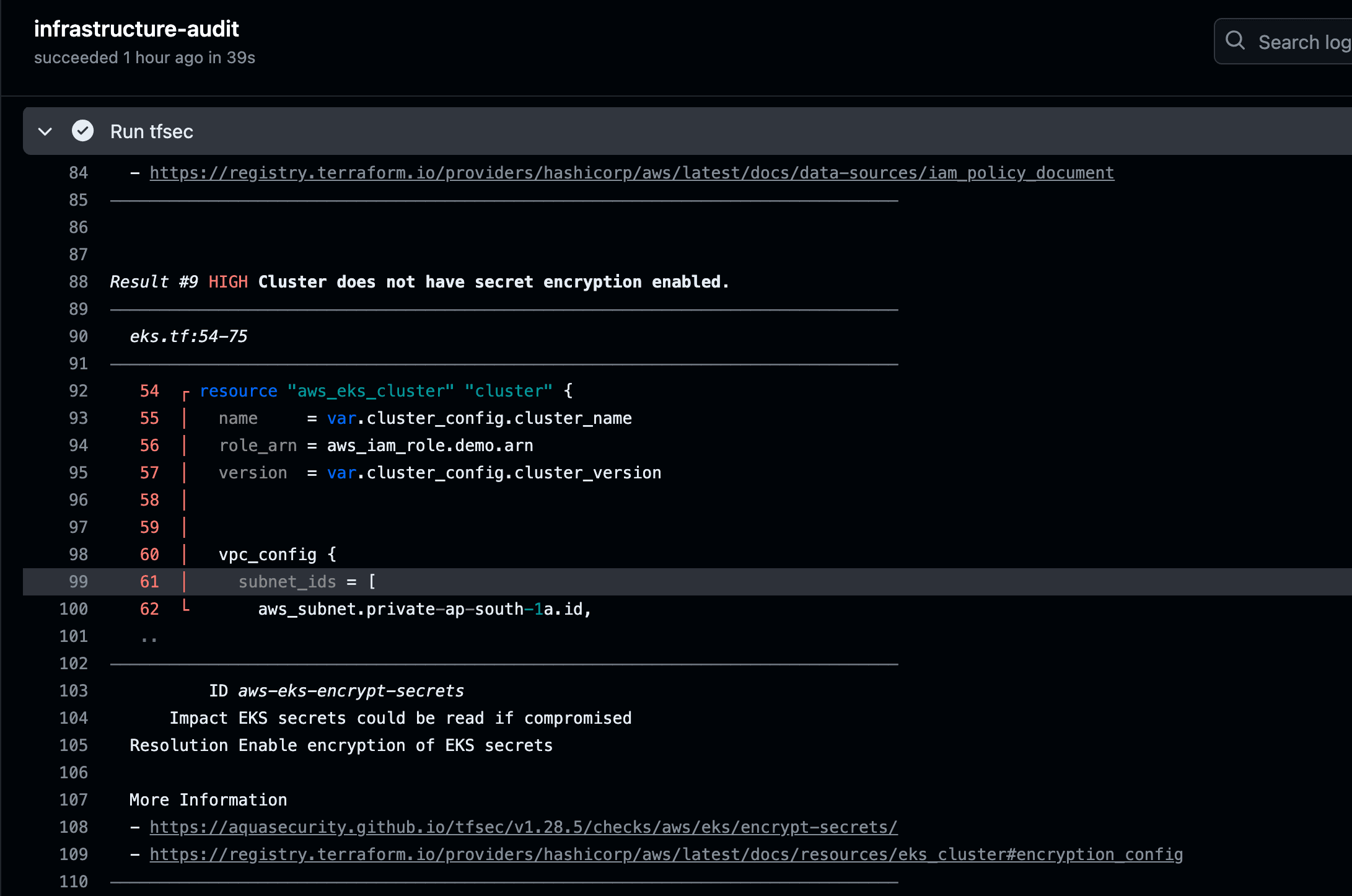
By leveraging both TFSec and Checkov within your GitHub Actions workflows, you gain a comprehensive understanding of potential security vulnerabilities within your infrastructure code. This proactive approach helps to identify and address security issues early on in the development lifecycle, before they can be exploited in production.
- Checkov
- Supports scanning for security misconfigurations across multiple infrastructure as code languages, including Terraform, CloudFormation, and Kubernetes.
- Offers a broader range of security checks beyond Terraform, making it a versatile tool for your DevSecOps pipeline.
- May require additional configuration compared to TFSec for Terraform-specific scanning.
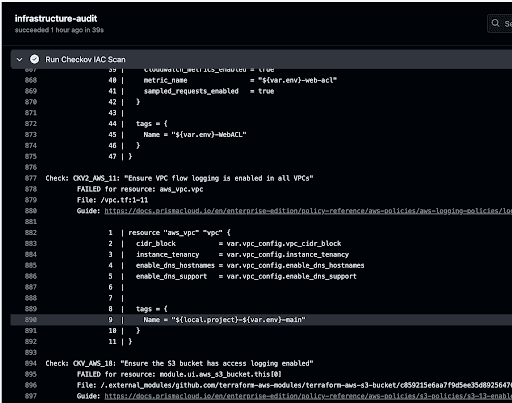
By leveraging both TFSec and Checkov within your GitHub Actions workflows, you gain a comprehensive understanding of potential security vulnerabilities within your infrastructure code. This proactive approach helps to identify and address security issues early on in the development lifecycle, before they can be exploited in production.
step 2.1: Code Commit and Build
- Code Commit: Developers push their code changes to a version control system like GitHub.
- Code Build Trigger: Upon a push event (or other configured triggers), GitHub Actions initiates the build process.
- Code Build with Build Spec The code is fetched from GitHub based on the workflow configuration. A build specification file (buildspec.yml) located in the code repository instructs the build process on what to do. This YAML file typically includes steps for installing dependencies, running tests, and building the application..
Step 3: Securing Your Codebase Throughout Development
Now that your infrastructure foundation is secure with IaC and your development pipeline is automated with GitHub Actions, let's focus on ensuring the security of your application code itself. This step involves utilizing various tools for code quality and security scanning throughout the development lifecycle.
- Git secrets scanning: Imagine accidentally committing a password or API key to your code repository. This could have disastrous consequences if exploited by malicious actors. Git secrets scanning tools help prevent such scenarios by identifying any sensitive information like passwords, access tokens, or cryptographic keys that might be unintentionally added to your codebase. These tools typically integrate with your version control system and alert developers when they attempt to commit such sensitive data.

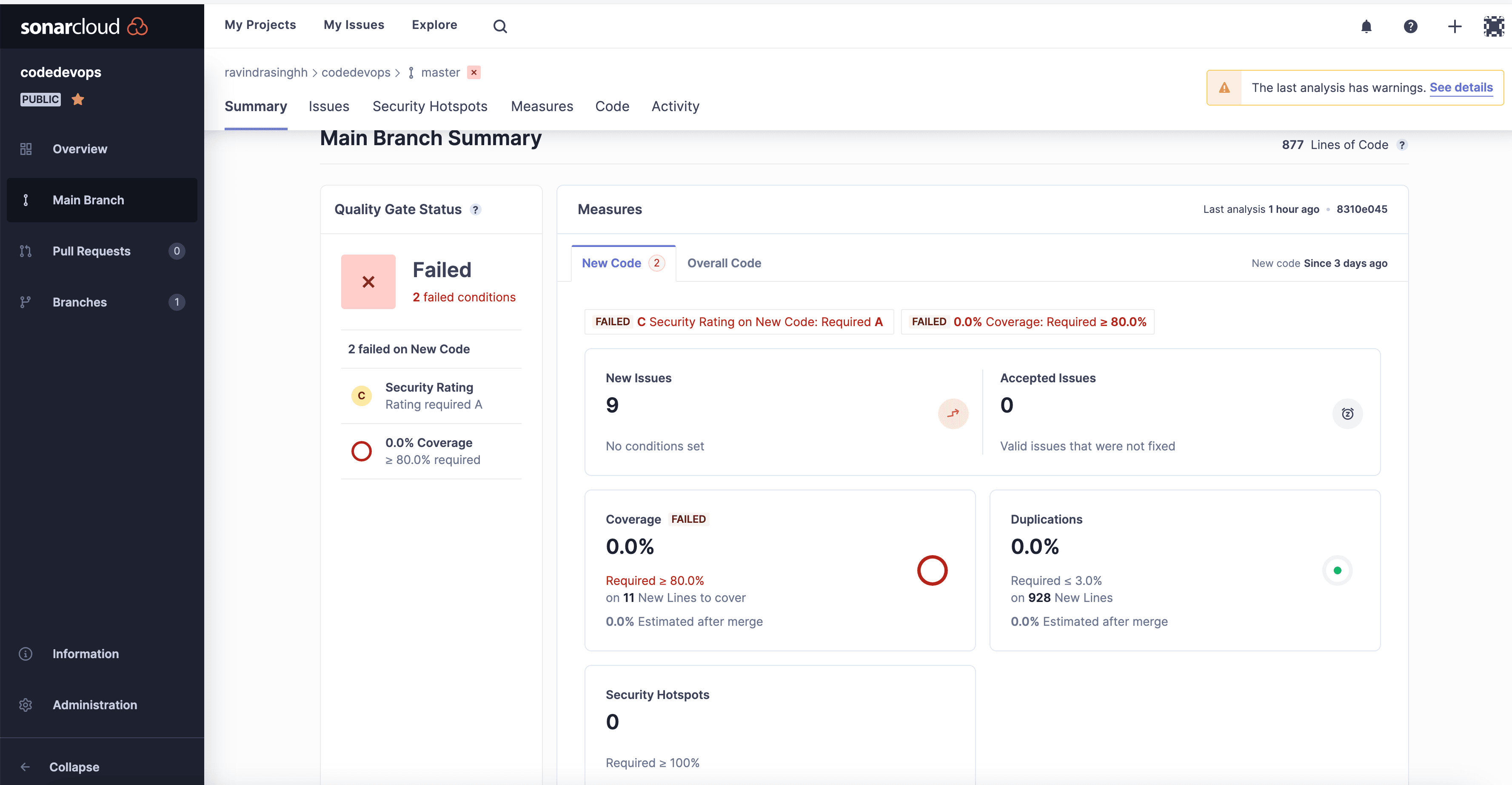
- SonarQube: Static code analysis tools like SonarQube act as your code's security watchdog. They analyze your application codebase searching for potential bugs, vulnerabilities, and code smells (indicators of potentially problematic code). SonarQube can identify issues like security vulnerabilities (e.g., SQL injection flaws), code that might be difficult to maintain, or potential performance bottlenecks. By integrating SonarQube into your development workflow, you can proactively address these issues early on in the development cycle, preventing them from becoming security risks or hindering the overall quality and maintainability of your code.
- Hadolint: Since your photo-sharing application will likely leverage containerization for deployment, Hadolint becomes a valuable tool. Hadolint specifically scans your Dockerfiles, which provide instructions for building your containerized application. Hadolint ensures your Dockerfiles adhere to security best practices and identifies potential vulnerabilities within them. This helps you build secure container images from the ground up, minimizing the attack surface of your application.

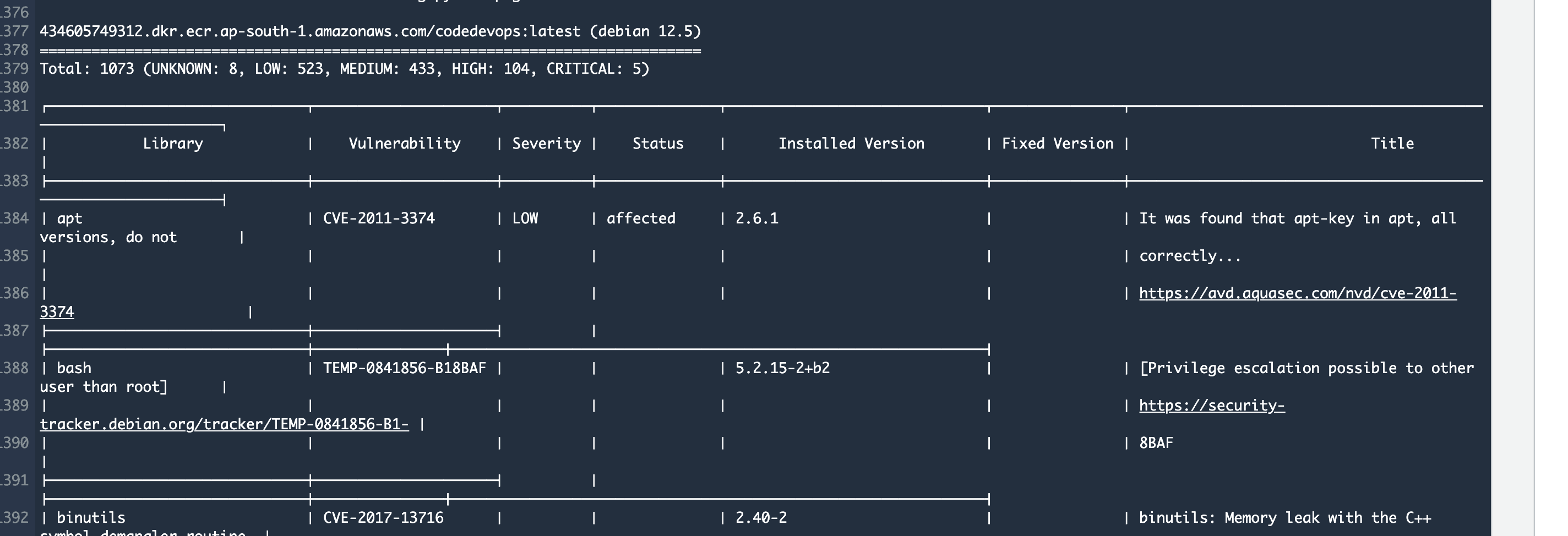
- Trivy: As you build container images from your code, Trivy comes into play. Trivy scans these container images for vulnerabilities before they are pushed to a secure container registry service like Amazon ECR (Elastic Container Registry). By identifying vulnerabilities early on, you can address them before deploying potentially vulnerable code to production. Trivy can scan for a wide range of vulnerabilities, including known security flaws in operating systems, libraries, and frameworks used within your container images.
- Amazon ECR (Elastic Container Registry): Now that your container images are secure, you need a secure place to store and manage them. This is where Amazon ECR comes in. ECR is a fully managed container registry that allows you to store, manage, and deploy your Docker container images securely. ECR integrates seamlessly with Amazon EKS, making it a convenient choice for deploying containerized applications.
- Amazon Elastic Container Service (EKS): Amazon EKS is a managed Kubernetes service that simplifies the deployment and management of containerized applications like your photo-sharing app. Kubernetes is an open-source container orchestration platform that automates the deployment, scaling, and management of containerized applications. By leveraging Amazon EKS, you can focus on developing your application code while EKS takes care of the complexities of managing your containerized application in production.
- Amazon DynamoDB (Optional): While EKS focuses on container orchestration, you might also need a database to store your application's data. Amazon DynamoDB is a NoSQL database service that offers high performance, scalability, and flexibility. It's a suitable choice for storing application data alongside your EKS-deployed photo-sharing application.
Step 4: Securing and Optimizing Your Deployed Application
Even after your application is successfully deployed, security remains a top priority. This step focuses on establishing measures for continuous monitoring and proactive security practices to safeguard your application in production.
Slack Notifications
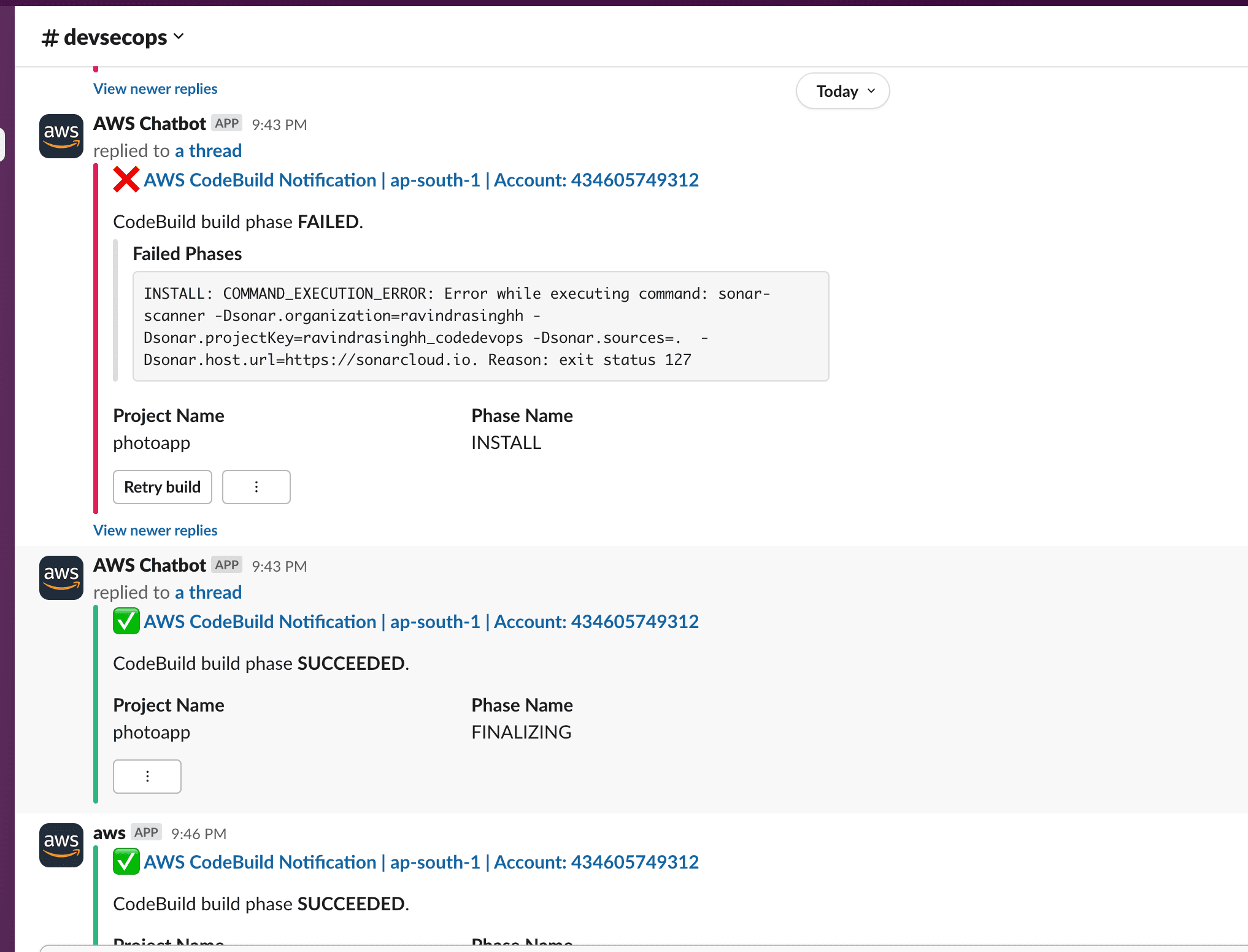
Integrate Slack notifications within your GitHub Actions workflows. This allows you to receive real-time alerts for various events throughout the development lifecycle, including:
- Successful code builds: Get notified when your code builds successfully, indicating a smooth build process and potentially signifying a successful deployment ahead.
- Security scanning results: Receive alerts from security scanning tools like Trivy highlighting any vulnerabilities identified within your container images. This allows you to address these vulnerabilities promptly before they can be exploited.
- Deployment failures: In case of deployment failures, Slack notifications will inform your team immediately, allowing for swift troubleshooting and intervention to resolve the issue and get your application back online.
Core Security Services
- AWS Key Management Service (KMS): Acts as a shield, protecting your application from common web attacks like SQL injection and cross-site scripting.
- AWS Web Application Firewall (WAF): In case of deployment failures, Slack notifications will inform your team immediately, allowing for swift troubleshooting and intervention to resolve the issue and get your application back online.
Enhanced Security and Performance
- AWS Certificate Manager (ACM): Provides easy issuance and management of SSL/TLS certificates for secure communication between users and your application.
- Amazon Route 53: Manages DNS resolution for your application, ensuring users can reliably reach your photo-sharing platform.
Content Delivery and Scalability
- Amazon CloudFront: This Content Delivery Network (CDN) caches static content like photos closer to users, resulting in faster load times and a more responsive user experience.
- Amazon S3: Provides secure and scalable object storage for your application's static content, including photos. S3 offers high durability and redundancy, minimizing the risk of data loss.
High Availability and Scalability
- Amazon CloudFront: This Content Delivery Network (CDN) caches static content like photos closer to users, resulting in faster load times and a more responsive user experience.
- Amazon Elastic Load Balancer (ELB): Distributes incoming traffic across your EKS cluster instances for scalability and high availability. This ensures your application remains online even if one instance encounters an issue.
Step 5: Continuous Vulnerability Scanning with Kubernetes and AWS Services
Security is an ongoing process, not a one-time event. Following deployment, we need to establish measures for continuous vulnerability scanning to proactively identify and address potential security risks within your application's environment. This step explores how Kubernetes-focused tools and broader AWS services can be leveraged for this purpose.
Kubernetes Security with Kubescape and Prowler
- 1. Kubescape: Imagine having a security scanner specifically designed for Kubernetes environments. Kubescape fulfills this role by continuously scanning your Kubernetes clusters for vulnerabilities and misconfigurations. It checks your deployments, secrets, configurations, and cluster resources for potential security issues. Kubescape can also be configured to identify resources that don't comply with your defined security policies. By integrating Kubescape into your monitoring pipeline, you can gain valuable insights into the security posture of your Kubernetes clusters and take corrective actions promptly.
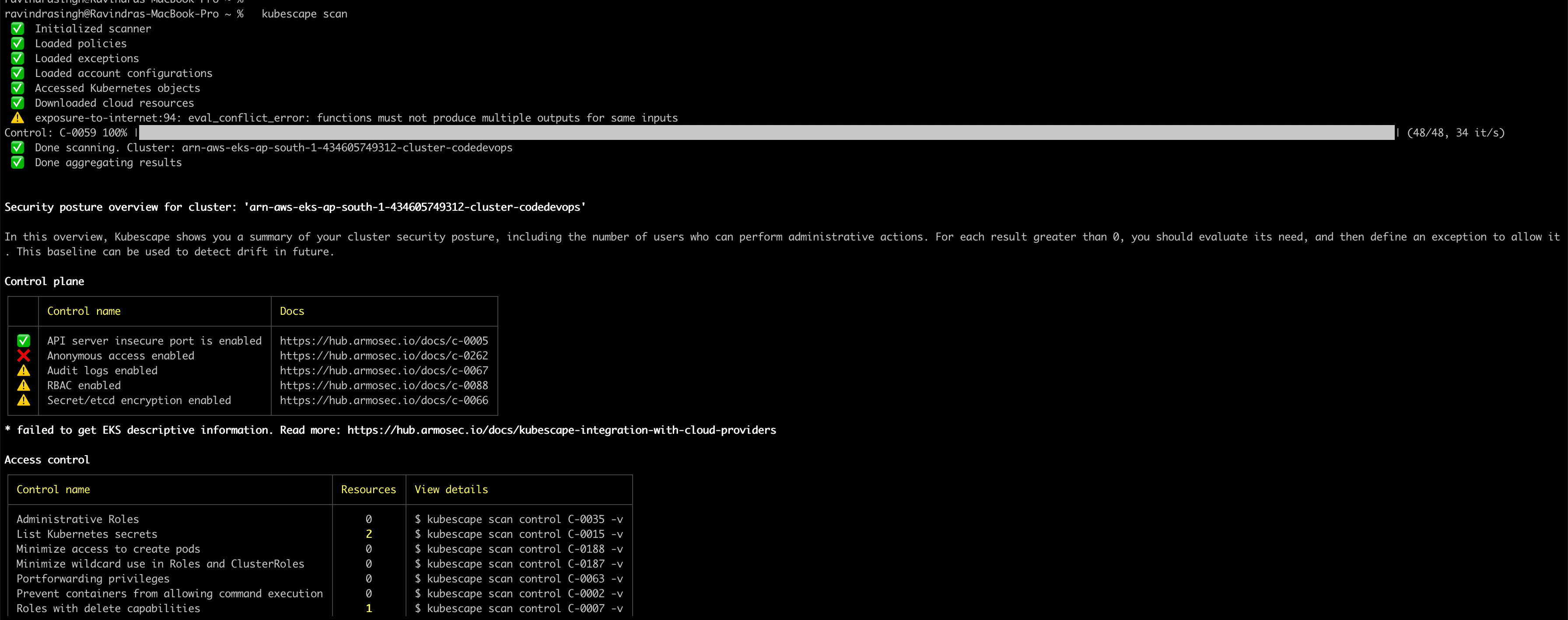
- 2. Prowler: While Kubescape provides a comprehensive security scan, Prowler offers a policy-driven approach. Prowler acts as a policy engine that can enforce security best practices within your Kubernetes clusters. You can define custom policies that specify security requirements for your deployments, secrets, and other cluster resources. Prowler then continuously monitors your clusters and alerts you if it detects any violations of these policies. This proactive approach helps you identify and address security misconfigurations before they can be exploited.
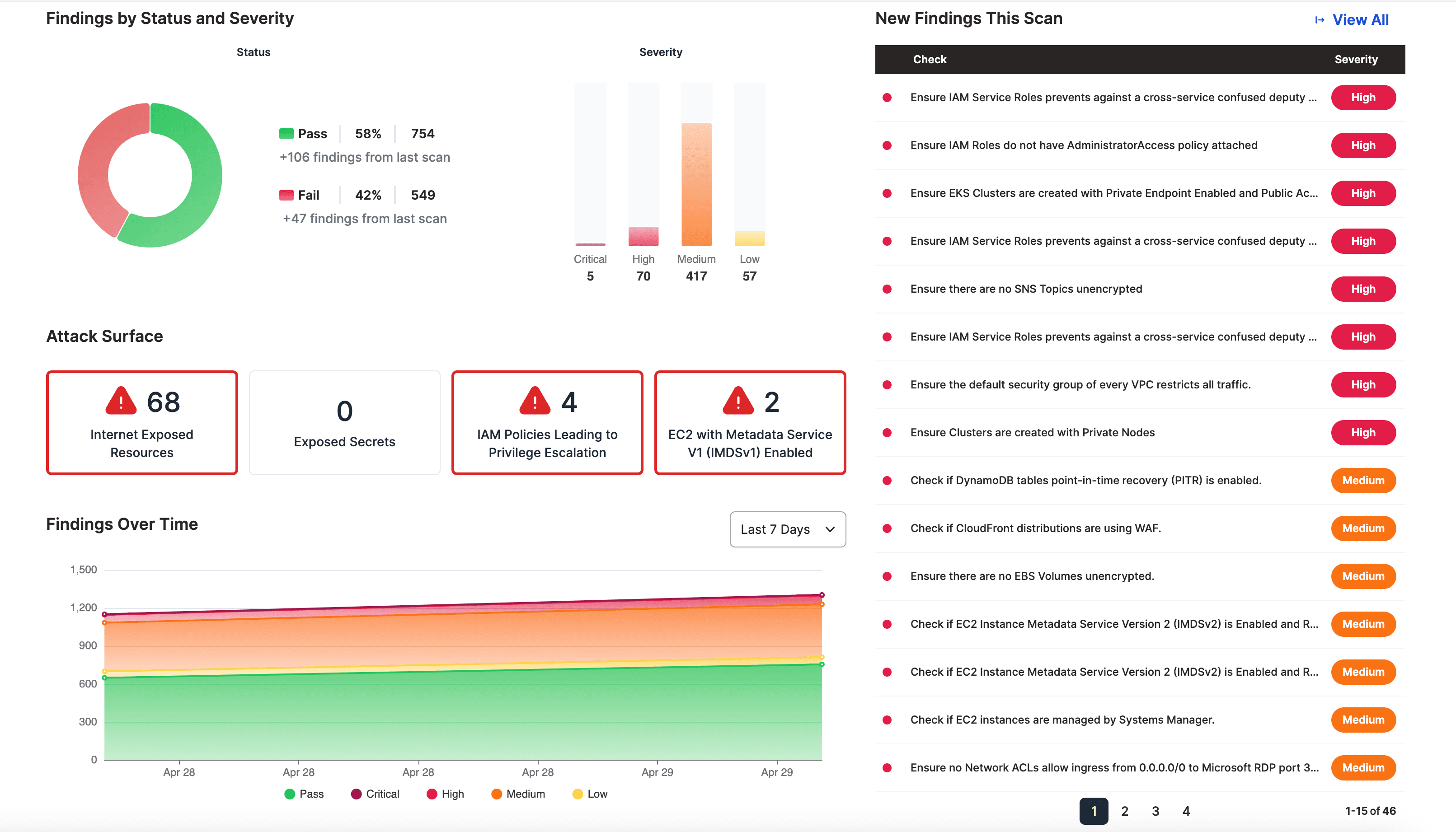
Continuous Monitoring with AWS Services
Beyond Kubernetes-specific tools, broader AWS services offer valuable functionalities for continuous security monitoring:
- 1. AWS Config: This service continuously monitors and records your AWS resource configurations. Config allows you to track changes to your resources over time and identify any unauthorized modifications or deviations from your desired configurations. This can help you detect potential security issues or configuration drift that might introduce vulnerabilities.
- 2. CloudTrail CloudTrail acts as an audit log for your AWS account. It records all API calls made to your AWS services, providing a detailed history of all actions taken within your account. CloudTrail allows you to monitor user activity, identify any suspicious API calls, and investigate potential security incidents.
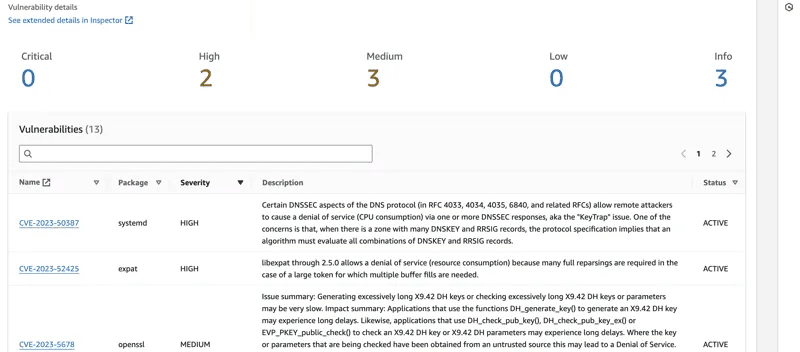
- 1. Amazon Inspector: Imagine an automated security assessment tool for your AWS resources. That's essentially what Amazon Inspector does. It scans your Amazon EC2 instances, Amazon S3 buckets, and container images in Amazon ECR for vulnerabilities. Inspector can be configured to run automated assessments on a regular basis, keeping you informed about potential security weaknesses within your AWS resources.
Building Resilience Through Chaos Engineering with AWS Fault Injection Simulator (FIS)
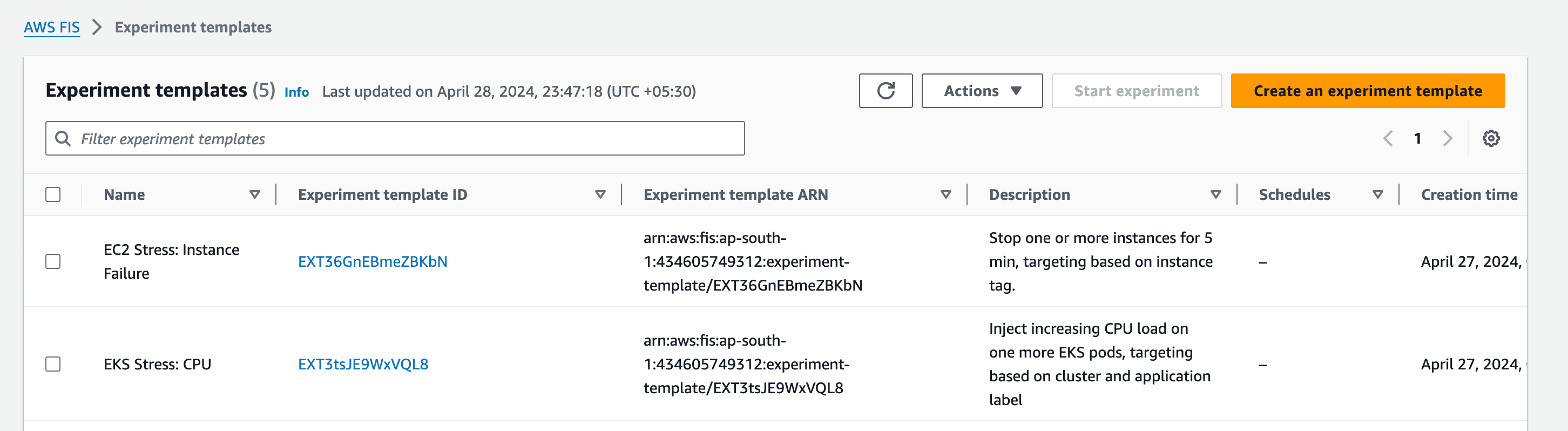
Security is just one piece of the puzzle for a robust application. What happens if your photo-sharing app experiences a sudden spike in traffic or encounters a hardware failure within its infrastructure? Chaos Engineering offers a proactive approach to prepare for such scenarios. This step explores how AWS Fault Injection Simulator (FIS) can be used to introduce controlled chaos and build resilience within your application.
The Power of Controlled Chaos
Injecting failures into your application might seem counterintuitive, but Chaos Engineering embraces this concept to proactively identify weaknesses. By simulating failures within your EKS cluster or other AWS resources using tools like AWS FIS, you can uncover potential issues before they disrupt your application in production.
How AWS FIS Works
AWS FIS is a fully managed service that allows you to define and execute fault injection experiments on your AWS resources. You can configure FIS to simulate various failure scenarios, such as:
- Stopping EC2 instances
- Introducing network latency
- Pausing I/O operations on EBS volumes
- Simulating pod crashes within your EKS cluster
By observing how your application responds to these simulated failures, you gain valuable insights into its resilience. This knowledge empowers you to:
- Identify single points of failure within your architecture.
- Improve the fault tolerance of your application.
- Develop automated recovery mechanisms to handle unexpected events gracefully.
- Strengthen your overall confidence in your application's ability to withstand disruptions.
Benefits of the DevSecOps Architecture for a Photo-Sharing Application
The DevSecOps approach offers a multitude of advantages for building a secure, reliable, and efficient photo-sharing application. Here's a breakdown of the key benefits:
Enhanced Security
By integrating security scanning throughout the entire development lifecycle, vulnerabilities are identified and addressed early on. This proactive approach significantly reduces the risk of security breaches that could compromise user data and application integrity.
Increased Development Efficiency
Automating tasks within the deployment pipeline using GitHub Actions streamlines the development process. This saves valuable time and effort for development teams, allowing them to focus on core functionalities and innovation.
Improved Reliability
Infrastructure as Code (IaC) ensures consistent and repeatable infrastructure provisioning. Configuration errors are minimized, leading to a more reliable and stable infrastructure foundation for your application.
Fostered Collaboration
DevSecOps bridges the gap between development, security, and operations teams. By establishing a shared understanding of security best practices, these teams can work collaboratively to deliver a secure and reliable application.
Compliance Assurance
Tools like Kubescape and Prowler can continuously monitor your deployed environment for vulnerabilities and misconfigurations. This helps ensure your application adheres to industry security standards and compliance regulations.
Faster Feedback and Issue Resolution
Real-time notifications from successful code builds in GitHub Actions empower development teams to identify and address issues promptly. This rapid feedback loop leads to a more efficient development process and quicker resolution of potential problems.
Challenges of Implementing DevSecOps (and How to Overcome Them)
While DevSecOps offers numerous advantages, implementing it effectively also comes with its own set of challenges. Here's a breakdown of some potential hurdles and how to address them:
Error Handling and Unexpected Events
Even with robust processes, errors and unexpected events can occur during deployment or operation. Having well-defined rollback plans in place is crucial for a smooth recovery process. Additionally, a skilled team capable of troubleshooting issues is essential for minimizing downtime and resolving problems efficiently.
Security Expertise
The success of DevSecOps relies on a certain level of security expertise within your team. Depending on your existing skillset, implementing DevSecOps effectively might necessitate additional training or even hiring security specialists. Consider investing in security awareness training for your development team and explore managed security services if needed to fill any knowledge gaps.
Balancing Security and Speed
DevSecOps strives to achieve a balance between security and smooth deployment. Overly stringent security measures can slow down development, while lax security can leave your application vulnerable. Finding the right balance is key, and this often involves collaboration and communication between development, security, and operations teams.
Importance of Following the Script
To ensure a smooth deployment and avoid potential issues, it's crucial to follow the provided script for authentication between CodeBuild and your Kubernetes cluster. This script plays a vital role in establishing a secure connection, enabling CodeBuild to interact with your Kubernetes environment seamlessly.
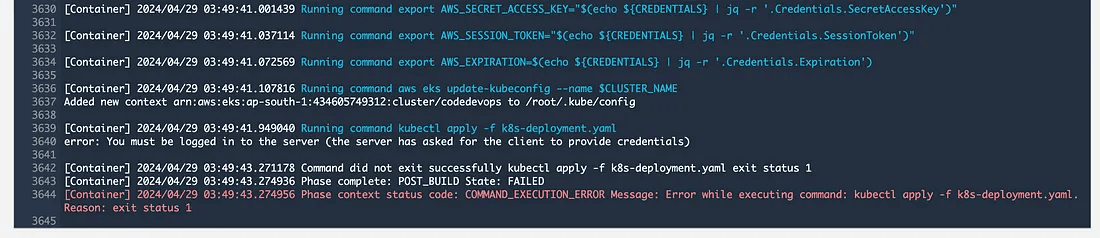
Script Link:
Cost Calculations
Here's a basic cost estimate for deploying your photo-sharing application on AWS using the services mentioned throughout the guide. Remember, these are estimates and your actual costs may vary depending on your specific usage patterns.
Region: Mumbai
Services:
- Amazon EKS: $0.10 per hour x 730 hours per month (assumed usage) = $73.00 USD.
- Amazon ECR: 100 GB per month x $0.10 per GB = $10.00 USD
- EC2 Instances: 1 Instance: $0.111 per hour x 730 hours per month = $81.03 USD
- 2 Instances: $81.03 USD x 2 = $162.06 USD
Conclusion
By following this guide and leveraging the provided resources, you can understand how to deploy a secure and resilient photo-sharing application with DevSecOps principles on AWS. Remember to carefully consider your specific needs and adjust the infrastructure accordingly to optimize costs and performance.