
Ravindra Singh
Introduction
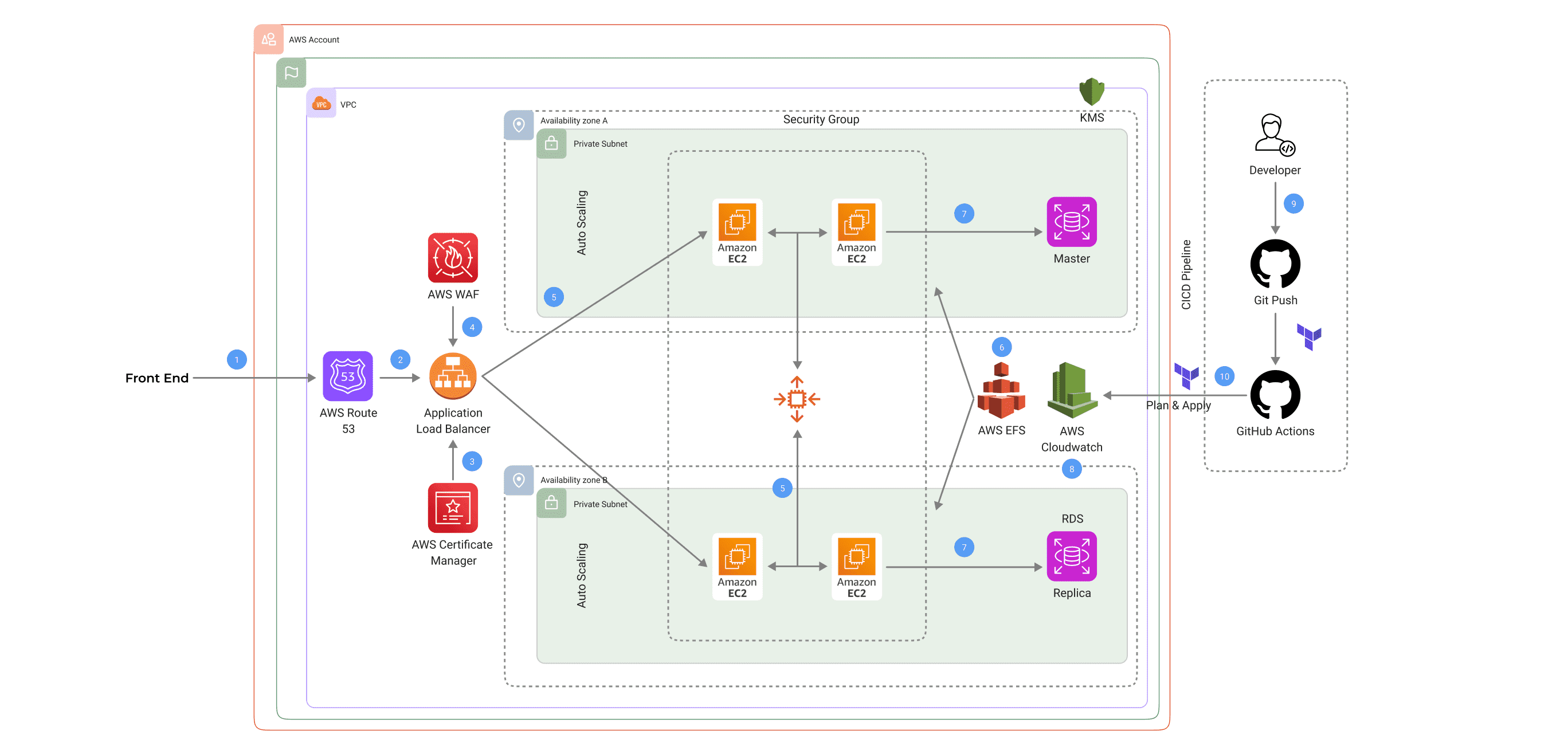
Imagine your online platform experiencing a surge in traffic during a major promotional event. Without a high availability setup, such a spike could lead to slowdowns, downtime, and lost revenue. Our mission is to build an AWS infrastructure that thrives even under challenges. In this blog, we will learn how to deploy an autoscaling group with an application load balancer, EFS, RDS, Route 53, ACM, WAF, and CloudWatch using step-by-step guides.
High availability ensures that applications stay operational and responsive even during unexpected disruptions. This guide will take you on a journey to deploy a full-stack AWS architecture using Terraform, designed to maximize uptime and performance. We'll explore the components involved, their roles, and how they come together to create a resilient and efficient system.
The Blueprint: Designing for Resilience
Our high-availability architecture leverages a range of AWS services, each meticulously chosen for its role in enhancing availability and performance. Let’s dive into each component and its significance.
1. DNS Setup with AWS Route 53
The first step is to set up your DNS using AWS Route 53. Every robust architecture starts with a solid foundation. AWS Route 53 ensures that user requests are directed to the correct resources. Route 53 lays the groundwork for seamless user experiences by resolving domain names to your application's infrastructure.
2. Balancing the Load with AWS ALB
Next, we introduce the AWS Application Load Balancer (ALB). Picture a traffic cop directing vehicles at a busy intersection. The ALB distributes incoming traffic across multiple EC2 instances, ensuring no single instance becomes a bottleneck. It also checks the health of these instances, ensuring traffic is only routed to those that are up and running smoothly.
3. Securing Transmissions with AWS Certificate Manager
In an era where data breaches are all too common, securing user data in transit is crucial. AWS Certificate Manager automates the provisioning and management of SSL/TLS certificates, encrypting data and providing a secure communication channel for users.
4. Shielding Your Application with AWS WAF
Think of AWS WAF as your application’s bodyguard. It stands at the front lines, protecting against common web exploits that could compromise security or impact performance. By configuring WAF, you add an essential layer of defense.
5. Ensuring Elasticity with Auto Scaling
Imagine your infrastructure as a balloon that can expand or contract based on demand. Utilize AWS Auto Scaling to maintain application availability and dynamically adjust the number of EC2 instances. This ensures optimal performance during traffic spikes and cost efficiency during quieter periods.
6. Providing Persistent Storage with Amazon EFS
Applications often require shared storage that is accessible by multiple instances. Amazon EFS offers a straightforward solution, providing persistent, scalable file storage that can be accessed concurrently by your EC2 instances.
7. Building a Resilient Database with Amazon RDS
Your database is the backbone of your application. Set up Amazon RDS with a master and a replica in different Availability Zones so that your database remains available even if an entire Availability Zone goes down. This setup offers both redundancy and fault tolerance.
8. Monitoring and Alerts with AWS CloudWatch
To keep your infrastructure in top shape, leverage AWS CloudWatch. It acts as a vigilant observer, monitoring performance metrics and setting up alerts for any anomalies, allowing you to address potential issues before they impact users.
9. Streamlining Development with CI/CD Pipelines
In a fast-paced development environment, quick and reliable deployments are a necessity. Utilize a CI/CD pipeline with GitHub Actions to allow your team members to push code changes rapidly, ensuring your application evolves smoothly and efficiently.
10. Automating Infrastructure with Terraform
At the heart of our setup is Terraform. This powerful tool allows you to script the entire infrastructure, making deployments repeatable and predictable. Use Terraform to manage changes with confidence, knowing that your infrastructure will be consistent across environments.
Benefits of a Highly Available Architecture
- Resiliency and Redundancy: Distributing resources across multiple Availability Zones minimizes the risk of single points of failure, ensuring system robustness.
- Scalability: Auto Scaling and Elastic Load Balancing adjust dynamically to traffic changes, maintaining performance during high-demand periods without the need for manual intervention.
- Enhanced Security: AWS WAF and AWS Shield provide robust protection against unexpected traffic patterns and DDoS attacks.
- Automation and Efficiency:Terraform’s infrastructure as code (IaC) approach simplifies infrastructure management, reducing the likelihood of human error and speeding up deployments.
Tips for Troubleshooting
Even with the best architecture, challenges can arise. Here are some troubleshooting tips to help you maintain high availability:
- Health Checks: Distributing resources across multiple Availability Zones minimizes the risk of single points of failure, ensuring system robustness.
- Database Failovers: Auto Scaling and Elastic Load Balancing adjust dynamically to traffic changes, maintaining performance during high-demand periods without the need for manual intervention.
- Latency Issues: AWS WAF and AWS Shield provide robust protection against unexpected traffic patterns and DDoS attacks.
Conclusion
By implementing a highly available AWS architecture with Terraform, you're laying the groundwork for a resilient, scalable, and secure infrastructure. This approach ensures your application can handle traffic spikes, maintain uptime, and provide a seamless user experience, even in the face of unexpected challenges. This setup not only mitigates risks but also positions your business for future growth and innovation. Investing in high availability is a strategic move that supports long-term success and stability, enabling you to focus on delivering value.